CO 모듈의 3대 마스터: Cost Center · Cost Element · Activity Type
2026. 5. 26. 21:33ㆍSAP CO/CATEGORY 1: 기초 (Foundation)
대상 독자: SAP CO 모듈 입문자, FI 컨설턴트, 회계 담당자, ERP 사용자 선행 지식: SAP CO의 기본 흐름 (비용 발생 → 집계 → 분석) 이전 글: [Project System (2): WBS Element가 CO Object로 작동하는 원리]
들어가며
지금까지 시리즈의 거의 모든 글은 다음 세 가지 마스터를 암묵적 전제로 사용했습니다.
표준원가 산정의 Activity Type 단가
정산(Settlement)의 Cost Element 매핑
PS Network Activity의 Cost Center 연결
이 모든 것의 출발점이 Cost Center · Cost Element · Activity Type입니다.
이번 글에서는 세 마스터에 대해 알아보겠습니다.
특히 S/4HANA에서 Cost Element는 G/L Account와 마스터가 통합되어 더 이상 별도로 만들지 않습니다.
1. 큰 그림 — 세 마스터가 만나는 지점
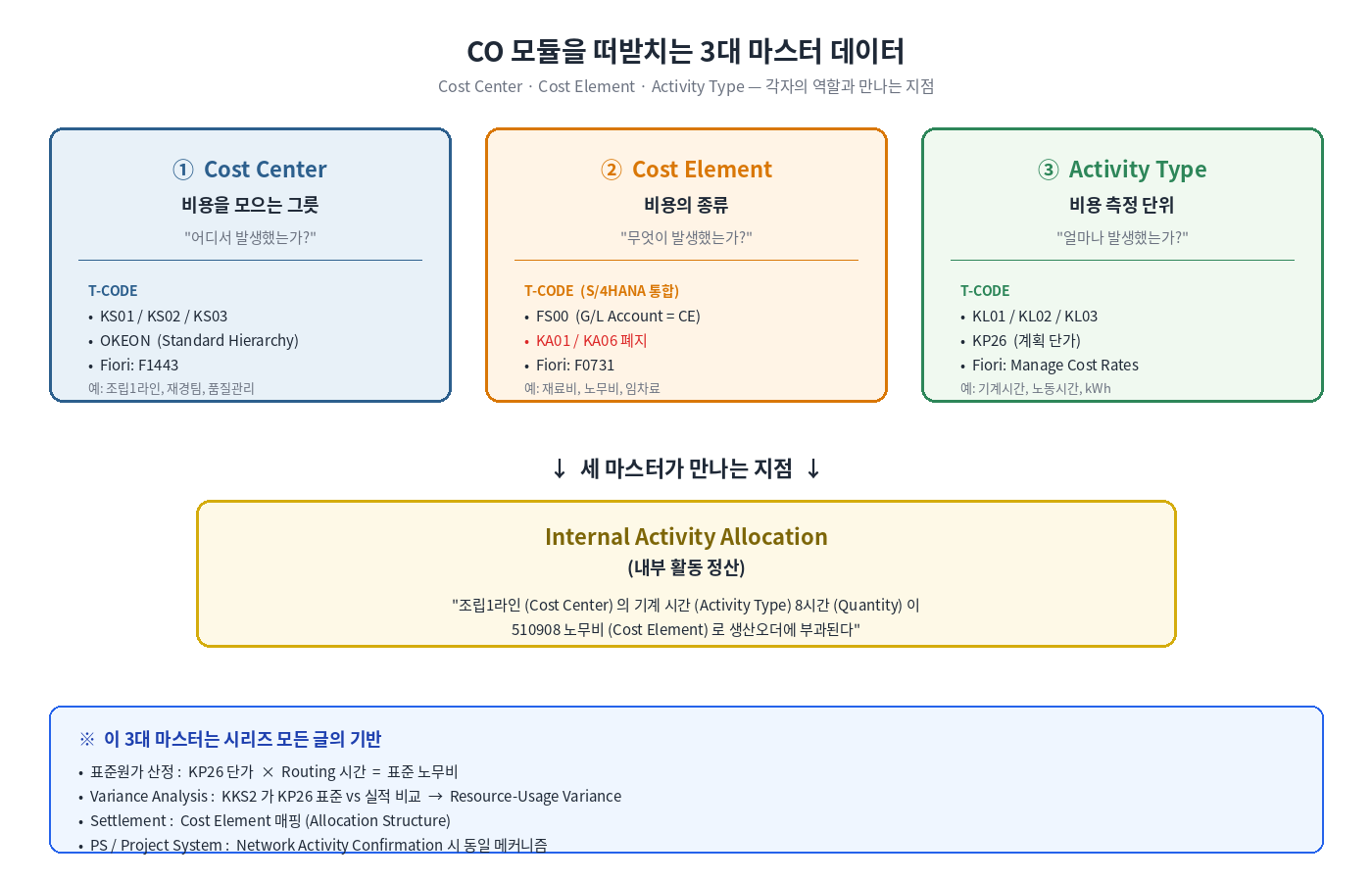
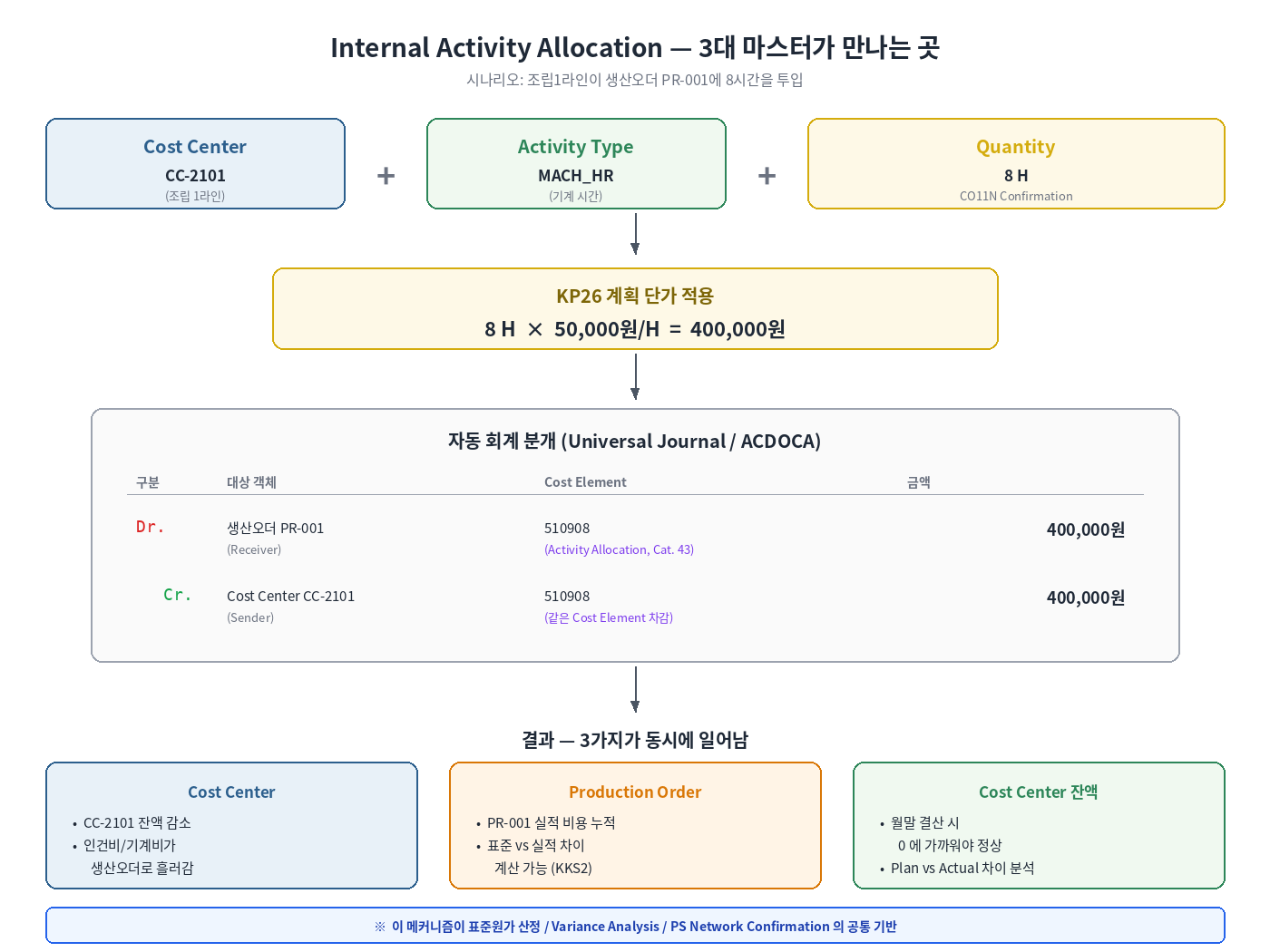
세 마스터는 각자 독립적이지만, Internal Activity Allocation(내부 활동 정산)이라는 하나의 지점에서 만납니다.
Internal Activity Allocation란? "발생 부서"에서 "실제 수혜자"로 비용을 옮겨, 누가 진짜 그 비용을 발생시켰는지를 추적하기 위한 메커니즘입니다. "Internal activity allocation involves allocating costs from production cost centers to manufacturing orders or product cost collectors during activity confirmation. — SAP Press, Product Cost Controlling with SAP"
3대 마스터 외에 보조 마스터 SKF(통계주요지표) 가 있습니다. 비용 배부 시배부 기준(Tracing Factor)으로 사용합니다. 기준이 인원수, 면적(㎡), 전화기 대수, 전력 사용량(kWh) 등이 될 수 있습니다. SKF는 두 카테고리가 있습니다.
Fixed Values: 새 값 입력 전까지 동일 값 유지 (예: 인원수)
Totals Values: 매 기간 새 값을 입력해 합산 (예: 월별 전력 사용량)
SKF는 Assessment Cycle(KSU1) / Distribution Cycle(KSV1)의 핵심 입력값으로, 3대 마스터가 비용을 '담는' 역할이라면 SKF는 비용을 '나누는' 기준입니다.
2. Cost Center — 비용을 모으는 그릇
Cost Center는 비용 발생 책임을 지는 조직 단위입니다. 부서·팀·라인·작업장 등 다양한 단위로 정의 가능합니다.
💡 공식 정의 (SAP Press) "Cost centers represent where costs occur, either by geographic location, area of responsibility, or both. Cost centers are grouped together in decision, control, and responsibility units in a hierarchical structure known as the standard hierarchy."
2.1 Cost Center 마스터의 핵심 항목
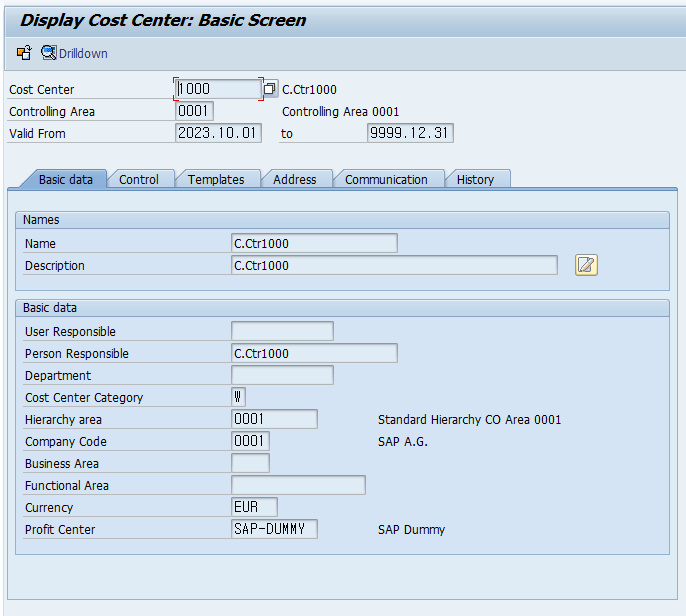
T-CODE: KS01 (생성) / KS02 (변경) / KS03 (조회)
항목
의미
Cost Center ID
식별자 (Controlling Area 내 unique)
Validity Period
유효 기간 — Cost Center는 시간 종속 객체
Person Responsible
책임자
Cost Center Category
카테고리 (Production / Service / Administration 등)
Hierarchy Area
Standard Hierarchy의 어느 노드에 속하는가
Company Code
소속 회사 코드 (Controlling Area 내 변경 불가)
Profit Center
연결될 Profit Center. Cost Center에서 발생한 비용은 이 필드에 매핑된 Profit Center로 자동 흘러가, 손익센터 단위의 재무제표(B/S, P&L)를 구성. Cost Center가 CO와 PCA를 잇는 가교 역할
시간 종속 객체란? Cost Center는 유효 기간을 갖는 시간 종속 객체입니다. Person Responsible 등 일부 필드는 시간 종속 필드로 설정 가능하여, 책임자가 바뀌면 같은 Cost Center에 새 기간의 마스터 레코드가 생성됩니다. 과거 시점의 책임자·조직 구조가 그대로 보존됩니다.
KS01/KS02 — Cost Center Basic Data 탭
2.2 Cost Center Categoryd
Cost Center Category는 Cost Center의 성격을 분류하는 1자리 코드입니다. SAP 표준은 다음과 같습니다.
Category
의미
활용
1
Production (생산)
직접 제조 라인
2
Service (서비스)
정비·품질·기타 부속 부서
3
Administration (관리)
본사 관리 부서
4
Sales (영업)
영업·마케팅 부서
L
Logistics (물류)
창고·운송
F
Research and Development (R&D)
연구개발
Category가 왜 중요한가? Activity Type 마스터에서 "이 Activity Type은 어떤 Category의 Cost Center에서만 사용 가능한가"를 제한할 수 있습니다. 예를 들어 MACH_HR(기계 시간) Activity Type을 Category 1(Production)에서만 사용하도록 제한하면 입력 오류를 사전에 차단할 수 있습니다.
2.3 Standard Hierarchy — 필수 구조
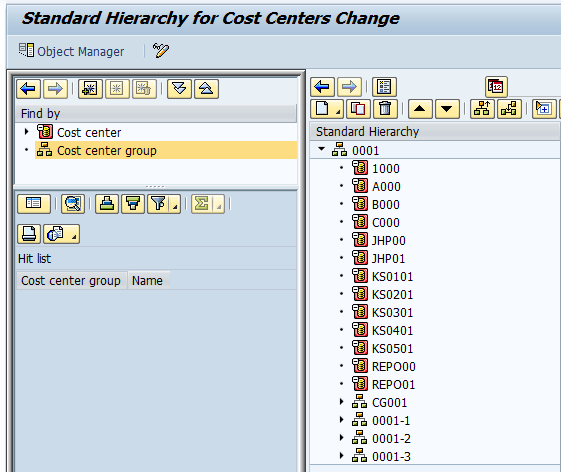
모든 Cost Center는 Standard Hierarchy의 어느 노드 아래에 반드시 속해야합니다. Controlling Area당 하나의 Standard Hierarchy만 존재합니다.
Standard Hierarchy의 정의 "The standard hierarchy is a mandatory field in cost centers. You must create the standard hierarchy and assign it to a controlling area before you can create any cost centers. This guarantees that the standard hierarchy contains all cost centers in a controlling area."
"Each node of the standard hierarchy is a cost center group. The standard hierarchy is really just a special cost center group that contains all cost centers."
그럼 Standard Hierarchy와 Cost center group의 차이점은 무엇일까?
Standard Hierarchy vs Cost Center Group
Standard Hierarchy: 강제 구조(필수). 모든 Cost Center가 단 한 노드에만 속함
Cost Center Group: 보고 목적의 자유 그룹(선택). 같은 Cost Center가 여러 그룹에 속할 수 있음
3. Cost Element — 비용의 종류 (S/4HANA의 가장 큰 변화)
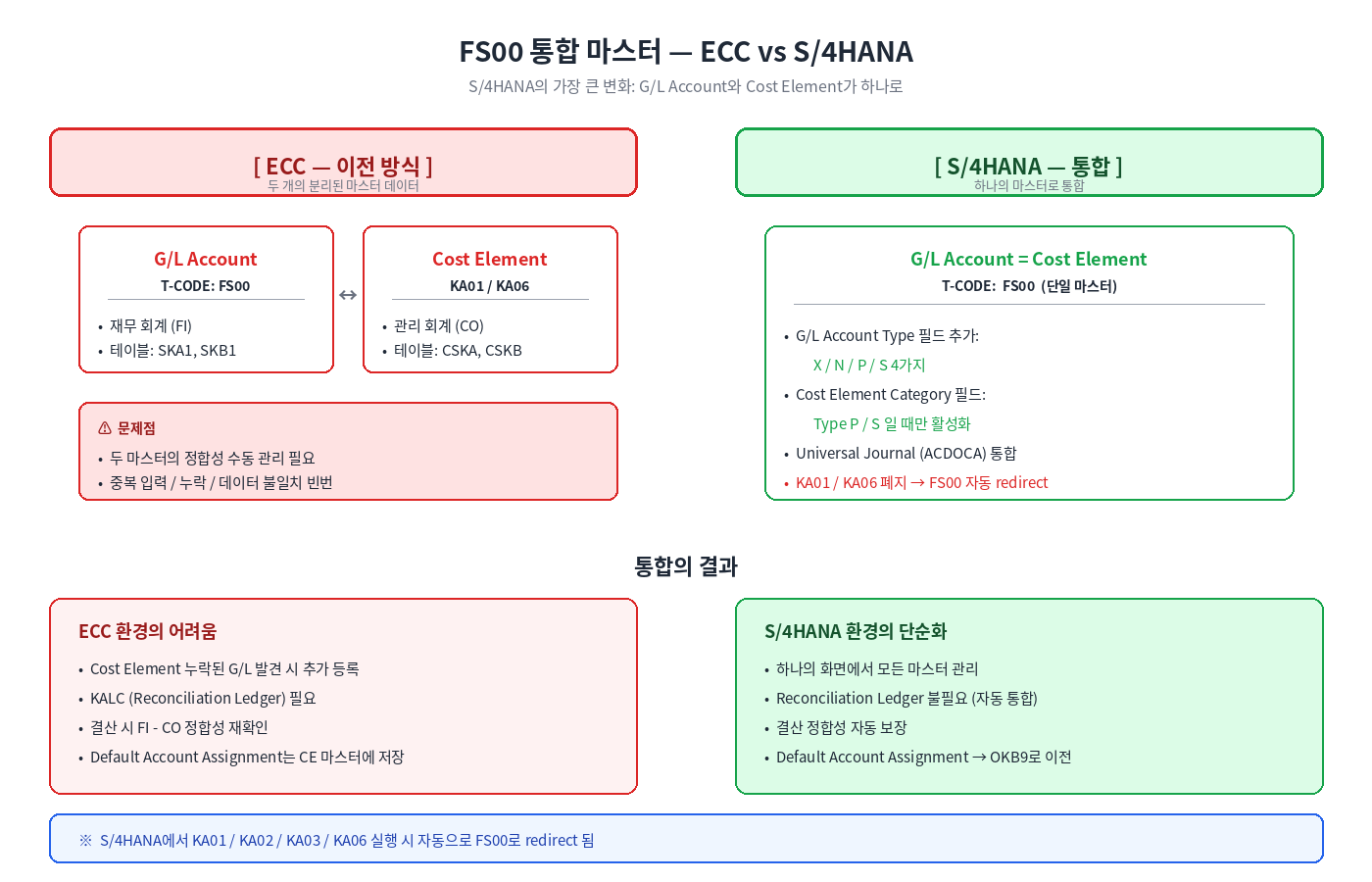
S/4HANA에서 Cost Element는 G/L Account와 통합되었습니다.
3.1 ECC vs S/4HANA — 핵심 변화
FS00 통합 마스터 — ECC vs S/4HANA 비교
구분
ECC (이전)
S/4HANA (현재)
G/L Account 생성
FS00
FS00 (통합)
Primary Cost Element 생성
KA01
폐지 → FS00
Secondary Cost Element 생성
KA06
폐지 → FS00
마스터 관리
별도
통합
결과
두 마스터 정합성 작업 필요
하나의 마스터로 단순화
S/4HANA에서 KA01, KA02, KA03, KA06을 실행하면 시스템이자동으로 FS00 화면으로 redirect합니다. 즉 사용 가능 거래 코드 목록에서 사실상 사라졌습니다.
모든 CO 비용은 FI의 G/L Account와 1:1 대응되는 Primary Cost Element를 통해 시작됩니다. 그리고 Secondary Cost Element는 CO 내부에서 비용을 분개하며 FI 분개 없이 작동합니다.
3.2 G/L Account Type 4가지
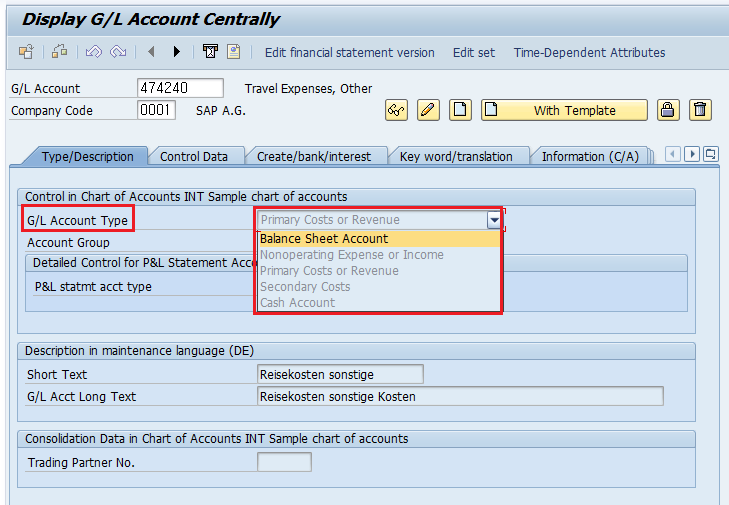
S/4HANA의 FS00에는 G/L Account Type 필드가 추가되었습니다. 이 필드의 값이 G/L Account의 성격을 결정합니다.
Account Type
의미
CO 영향
X
Balance Sheet Account
대차대조표 계정 (CO 무관)
N
Nonoperating Expense or Income
P&L 계정이지만 CO 할당 불필요
P
Primary Costs or Revenue
P&L 계정 + CO 할당 필수 (= Primary Cost Element)
S
Secondary Costs
CO 내부 정산 전용 (= Secondary Cost Element)
같은 P&L 계정이라도N은 CO 할당 불필요(예: 단순 회계 처리만 필요한 항목),P는 반드시 CO Object 필요(Cost Center, Order, WBS, CO-PA). 이 차이가 곧 ECC 시절의 'Cost Element 등록 여부'와 같은 의미입니다.
3.3 Cost Element Category — 어떤 거래에 사용되는가
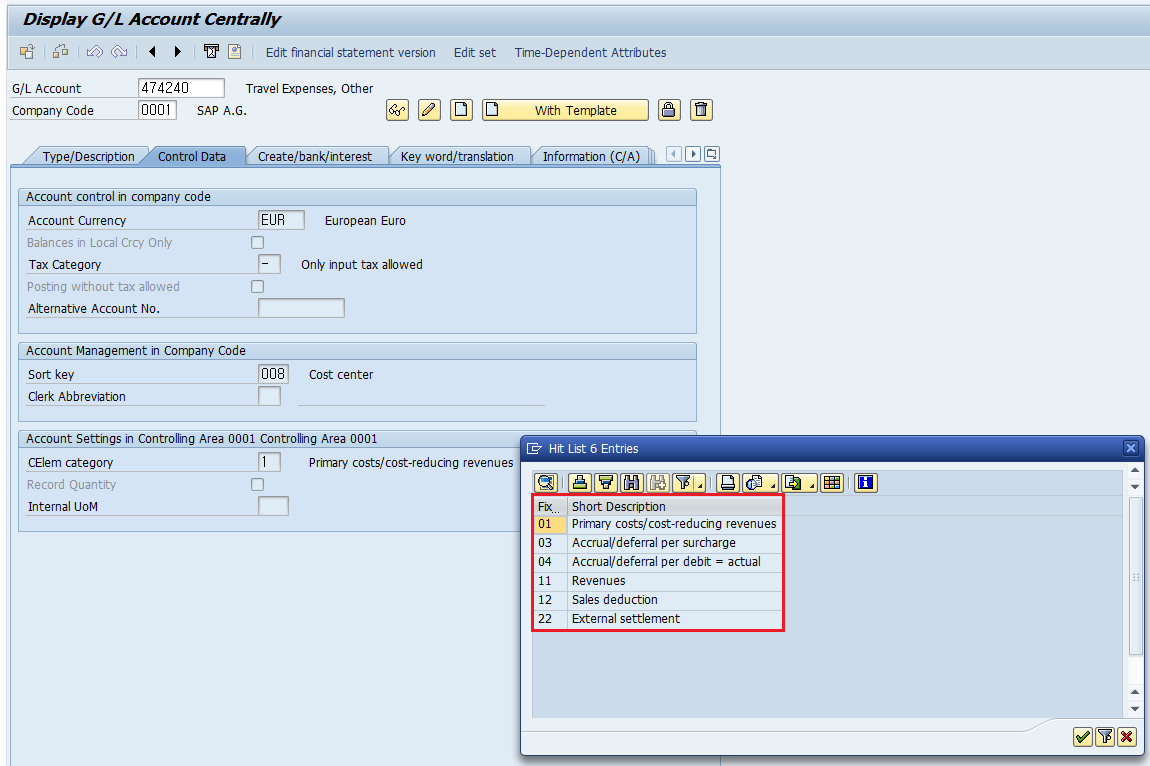
Account Type이 P 또는 S일 때 추가로 지정해야 하는 항목이 Cost Element Category입니다.
Cost Element Category 체계
1) Primary Cost Element (Account Type P)
Category
명칭
활용 예
1
Primary costs / Cost-reducing revenues
일반 비용 계정 (재료비, 노무비, 임차료)
11
Revenues
매출 계정
12
Sales deduction
매출 차감 (할인, 반품)
22
External Settlement
자산(Asset)으로 정산되는 비용
90
Statistical Cost Element (BS)
자산·자재 BS 계정의 통계 추적
2) Secondary Cost Element (Account Type S)
Category
명칭
활용 예
21
Internal Settlement
생산오더 → 자재, WBS → CC 정산
31
Order/Project Results Analysis
WIP 산정, Result Analysis
41
Overhead Rates
Costing Sheet의 Credit Key (간접비 부과)
42
Assessment
Cost Center → Cost Center Assessment (KSU5)
43
Internal Activity Allocation
Activity Type 단가 부과 (KP26 단가)
Category 43은Activity Type 마스터에 반드시 지정되는카테고리입니다. KP26 단가로 인건비·기계비를 부과할 때 자동으로 사용되는 Secondary Cost Element가 Category 43입니다.
G/L Account 마스터 Type/Description 탭의 G/L Account TypeG/L Account Type + Control Data 탭의 Cost Element Category
3.4 OKB9 — Default Account Assignment
Primary Cost Element(Type P) 거래마다 매번 Cost Center를 지정하는 것은 번거롭습니다. OKB9에서 G/L Account + Company Code 조합별 기본 Cost Center를 미리 지정해두면 자동 할당됩니다.
[OKB9 설정 예시]
G/L 510102 (재료비) + Company Code 1010 → 기본 Cost Center: CC-2101
G/L 520301 (전력비) + Company Code 1010 → 기본 Cost Center: CC-2202
OKB9 — Default Account Assignment
4. Activity Type — 비용을 측정하는 단위
Activity Type은 Cost Center가 제공하는 서비스의 종류와 단위를 정의하며, 그 비용을 생산오더·WBS 등 수취 객체로 옮기는 매개체입니다.
Activity Type이란? "Activity types describe activities provided by cost centers and allow costs to be allocated to receiving objects such as manufacturing orders, product cost collectors, and other cost centers."
4.1 Activity Type 마스터의 핵심 항목
- T-CODE: KL01 (생성) / KL02 (변경) / KL03 (조회)
[Activity Type : MACH_HR (기계 시간)]
    │
    ├── Validity Period: 2026.01.01 ~ 9999.12.31
    ├── Activity Unit: H (시간)
    ├── CCtr categories: 1, 2  (사용 가능 Cost Center Category 제한)
    ├── ATyp category: 1  (Manual entry, manual allocation)
    ├── Allocation Cost Element: 510908 (Category 43)
    └── Price Indicator: 3 (Determined manually)
4.2 Activity Type Category — 4가지
활동량의입력 방식과 부과 방식을 결정합니다.
"The ATyp category determines whether and how you record and allocate an activity type."
Category
입력 방식
부과 방식
활용
1
Manual entry
Manual allocation
가장 일반적. KB21N으로 직접 입력하여 부과 (생산오더 Confirmation)
2
Indirect determination
Indirect allocation
KSCB로 간접 부과 (Sender 활동량을 자동 결정)
3
Manual entry
Indirect allocation
활동량은 입력, 부과는 간접 (Cycle로 일괄 처리)
4
Manual entry
No allocation
통계 목적만 (실제 부과 없음, Target Cost 계산용)
한국 제조업에서는 대부분Category 1을 사용합니다. 작업자가 생산오더에 작업 시간을 Confirmation(CO11N) 또는 PS의 CN25로 입력하면 자동으로 부과되는 구조입니다.
4.3 Allocation Cost Element — Activity Type의 핵심 연결고리
Activity Type 마스터의 핵심 필드 중 하나가 Allocation Cost Element입니다. 거래가 발생한 후에는 절대 변경 불가이므로, 신규 Activity Type 등록 시 반드시 신중히 결정해야 합니다.
"The Allocation cost elem entry determines the default value when you enter the planned activity price and quantity with Transaction KP26. You can overwrite the default cost element when planning for the first time. Once transactions occur, you cannot change this cost element."
위에서도 언급했지만 반드시Category 43 (Internal Activity Allocation)의 Secondary Cost Element를 지정해야 합니다. 일반 Primary Cost Element(Category 1)나 다른 Secondary Cost Element를 지정하면 "Cost element XXX is not relevant for activity allocation" 에러가 발생합니다.
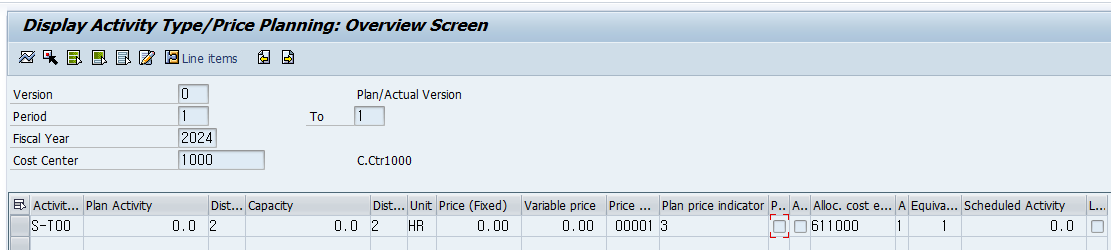
4.4 KP26 — 단가 계획
Cost Center와 Activity Type 조합에 계획 단가를 입력하는 화면이 KP26입니다.